How to charge your electric vehicle only with solar surplus and the Fronius Wattpilot charger

How to charge only with solar surplus with your Fronius Wattpilot charger.

If you have batteries in your Fronius GEN24 inverter and you want to know how to set up your Fronius Wattpilot charger so that DO NOT use the battery to charge your electric vehicle and that ONLY use the surplus solar photovoltaic, you're in the right place... In this post we answer the query of one of our followers and explain how to configure your Fronius Wattpilot so that it does not use the battery when you have to charge your electric car.

fronius wattpilot charger
How to charge your electric vehicle with only surplus solar power and the Fronius Wattpilot 8 charger.

Configure your Wattpilot charger to avoid using the battery

To charge your electric vehicle only with the solar surplus, you just have to connect to the Fronius Solar.wattpilot APP to enter the configuration of your Fronius Wattpilot charger and follow the steps below;

Step-by-step guide to configure the Wattpilot charger for solar charging:

App Wattpilot 1 2

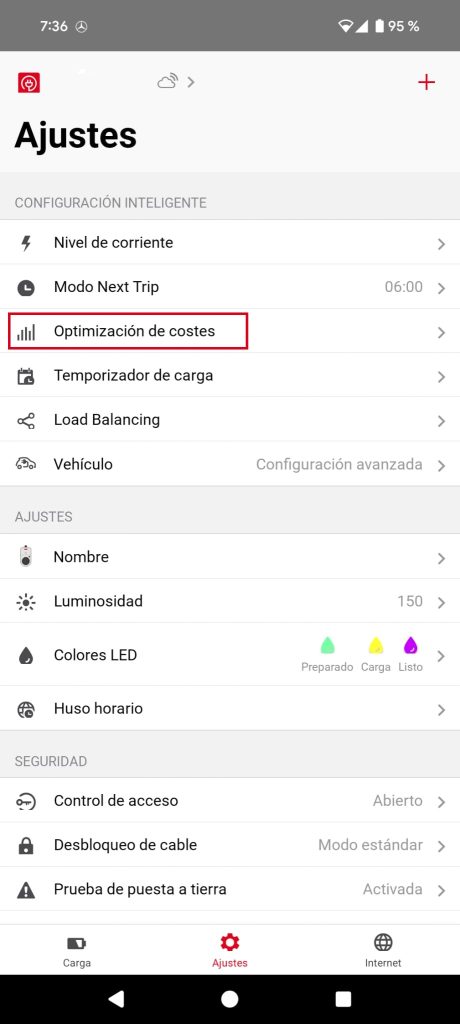
Step 1: Settings > Cost optimisation

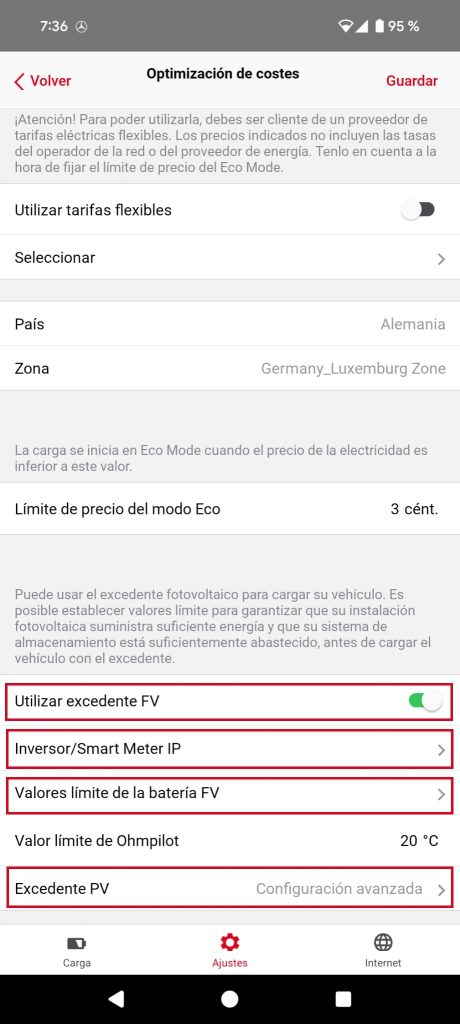
The first step after connecting with our smartphone to the Wattpilot charger is to enter the Solar.Wattpilot application and click on "Cost optimisation".


App Wattpilot 2

Step 2: Cost optimisation > Available options

Once inside "Cost optimisation" we see at the bottom 4 options that we are interested in;

Use surplus PVThis option must be activatedThis way we will be able to charge our car using the solar surplus. It is the first step but not the only one...

Afterwards, we go to Inverter/Smart Meter IP


App Wattpilot 3

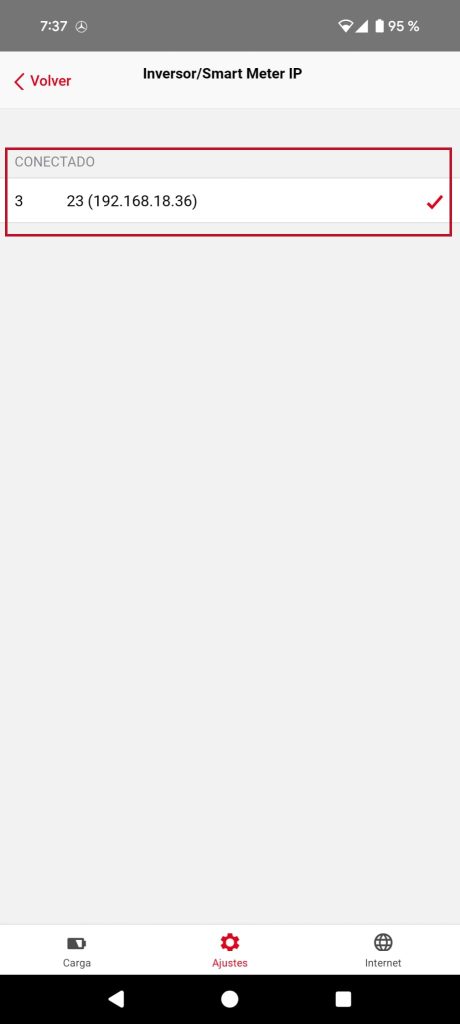
Step 3: Inverter/Smart Meter IP

It will not be the norm, but if you have several Fronius inverters in your installation, you will need to select the one you will use to charge your electric vehicle with the solar surplus. If you only have one inverter, you will not have to touch anything.

Then we enter the PV battery limit values.


App Wattpilot 4

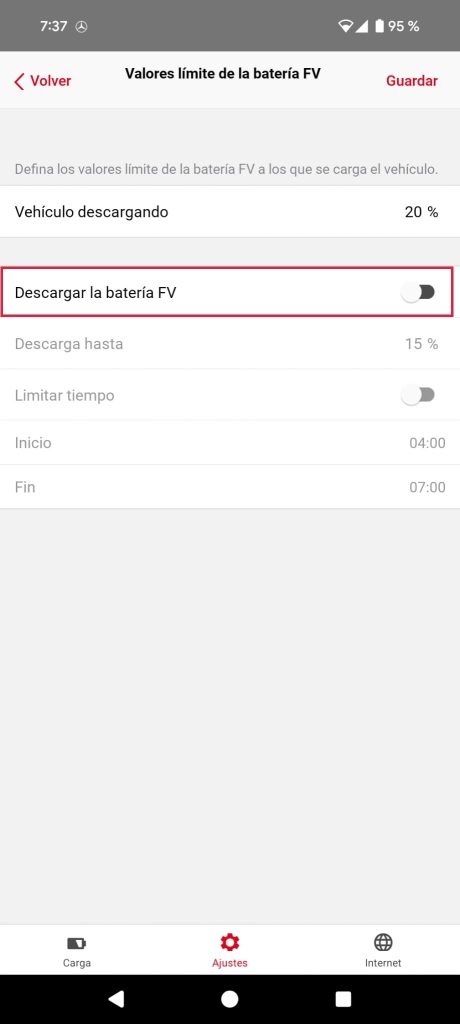
Step 4: Limit values of the PV battery

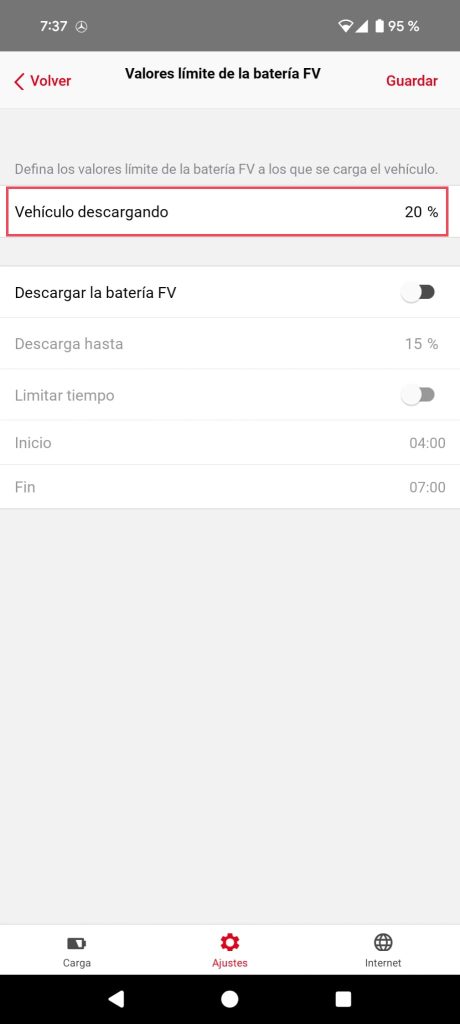
The next step will be to disable the option that enables downloading of the solar battery of our photovoltaic installation. If we leave it activated, we can set a maximum permitted discharge percentage and limit this discharge in the central hours of the day, for example if we know for sure that our battery will be fully charged or with the possibility of charging later with the surplus.

Then we go to the last step; Surplus PV


App Wattpilot 5

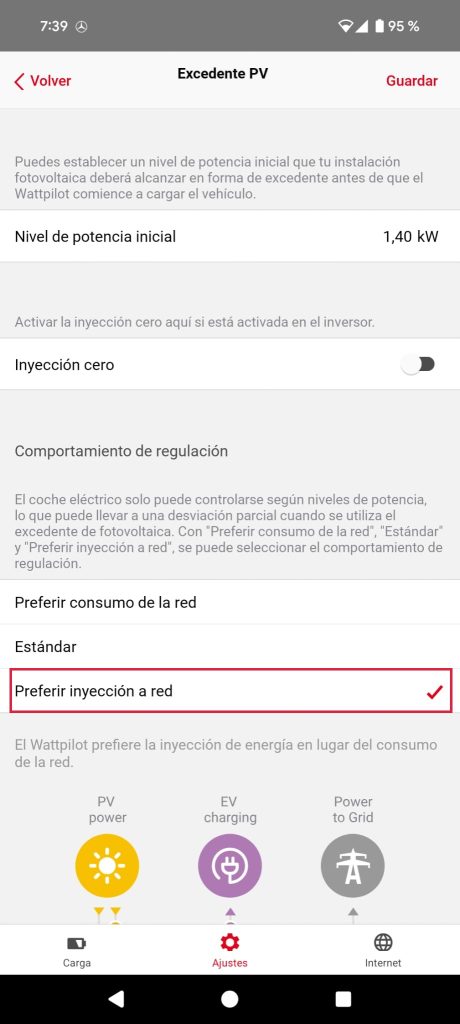
Step 5: Surplus VP

This step is one of the most important, as at certain times, we will not have enough photovoltaic surplus to start charging our electric car. It is not enough to have 10W-300W, as a minimum we have to reach an intensity of 6A (1.38 Kw) which is generally the minimum required by electric cars. Although the recommended value is the default value, we can modify it as we wish if necessary.

Now... If I don't reach that initial power level, what happens to the charge of our car?

Prefer network consumptionSelect this option ONLY IF YOU CANNOT DUMP SURPLUSES. This option allows you to charge your electric car with the electricity grid + solar surplus without feeding into the gridIf you still have surpluses while charging, it does not inject them into the grid. This is the option you have to tick if you have a 0 discharge.

Standard: This option allows the electric car to be charged with the electricity grid + solar surplus WITH feed-in tariffs. This will be the most common option and allows grid-supported charging as soon as you have some solar surplus. When the solar surplus exceeds what the car is capable of charging, it dumps the surplus to the grid. It would be like the "Prefer grid consumption" option but allowing you to dump the surplus.

No no... I always have a lot of surplus solar energy... In that case;

Prefer grid injectionIf you are sure that you will always have sufficient surplus ("Initial power level") to charge the car, this is the option to tick. ONLY uses the surplus to charge the electric vehicle. (once the "Initial power level" has been reached) and if there are surpluses, it feeds them back into the grid. However, as long as the "Initial power level" is not reached, the surplus is fed back into the grid.


App Wattpilot extra

EXTRA Step: Priority Electric Vehicle o Battery Fronius Reserve / B&R

If we also want to give preference for electric vehicle chargingIn the "Vehicle unloading" section, we must set the "Vehicle unloading" to a 20%. So that once the 20% State-of-charge on Fronius Battery Backup or B&D, charging priority is given to the electric vehicle. Let's say that is the minimum charge value of our solar installation necessary for us to start charging the car.. For a better understanding we will give an example;

Example;

We set the parameter "Vehicle unloading to the 20% and connect our vehicle to the charger.:

If the Fronius Reserve / B&D battery is at 10%: The Fronius Reserve / B&D battery is given charging priority over the car battery.

If the Fronius Reserve / B&D battery is at 30%: Charging priority is given to the car battery over the Fronius Reserve / B&D battery.


So that's it, I hope this guide will answer all your questions and that you will get the most out of your Fronius GEN24 inverter, your Fronius Wattpilot charger and very soon... your new Fronius Reserva battery.

Share this post:

Other blog entries

Victron MultiPlus: Your Backup in the Event of Another Power Outage

⚡ INVERTER/CHARGER - ENERGY BACKUP Victron MultiPlus:Your Backup in the event of another blackout After the major blackout on 28 April 2025, millions of homes in Spain were left without power. Victron Energy's MultiPlus range is the professional solution to prevent this from happening again. Inverter, charger and automatic switch in a single unit.

Read more "

Victron Lithium SuperPack NG: The Battery That Changes Everything

🔋 LiFePO4 LITHIUM BATTERY - NEW GENERATION Victron Lithium SuperPack NGLThe Battery that Changes Everything The new generation of Victron lithium batteries with integrated intelligent BMS. Maximum safety, durability and performance for your solar or mobile installation. 50/100Ah Capacities LiFePO4 Lithium iron chemistry +2500 Life cycles BMS Integrated intelligent Bluetooth Monitoring Plug&Play Installation

Read more "
Inverter Phoenix VE.Direct 12|1600 Victron Energy - pure sinewave inverter 12V 1600VA

Phoenix Inverter VE.Direct 12/1600: All you need to know

⚡ PURE WAVE INVERTER - COMPLETE GUIDE Phoenix Inverter VE.Direct 12/1600Everything you need to know The most reliable pure sine wave inverter for 12V installations. Converts your battery power into quality 230V AC to power any electronic equipment. 1600VA Nominal power 3000VA Peak power 30 sec. 12V DC Input voltage 230V

Read more "